Jawwy Balance Check: How to Check Your Jawwy Balance, Number and Recharge in Saudi Arabia?
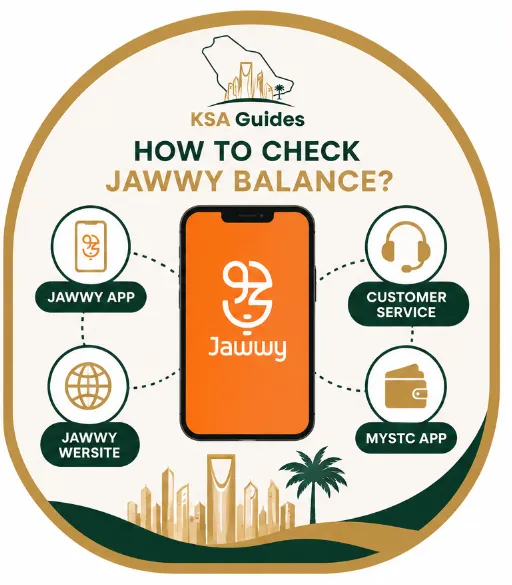
Jawwy is a digital-only mobile service operated by STC (Saudi Telecom Company) in Saudi Arabia, managed entirely through the Jawwy app. Unlike STC Sawa, Mobily, or Zain, it has no USSD Jawwy balance check code like dialling *166# on a Jawwy SIM does not work. The only ways to check your Jawwy balance are through the Jawwy app, the Jawwy website, or by calling customer service on 900.
To check the Jawwy balance do this next:
- Download the Jawwy app from the Google Play Store or Apple App Store
- Log in with your registered Jawwy mobile number
- Your credit balance, remaining data, and package validity appear on the home screen
Jawwy Has No USSD Balance Check Code
Many Jawwy subscribers try dialling *166# to check their balance, because this code works on STC’s Sawa prepaid service. On a Jawwy SIM, it does not work at all.
Jawwy is a digital-only mobile service launched in 2017 by STC (Saudi Telecom Company), built specifically for users who manage everything through a smartphone. Because Jawwy was designed as a 100% app-based service, STC did not build USSD infrastructure into it.
No dial code exists for balance, data, or package status checks on a Jawwy SIM — not *166#, not *888#, and not any other combination. Several sites currently publish Jawwy USSD codes that do not function. If you have tried those codes and received no response, that is why.
Two codes do work on Jawwy SIMs, but for different purposes entirely:
- Dial *150# to display your Jawwy mobile number on screen
- Dial *155*[14-digit PIN]# to redeem a physical recharge voucher
Neither of these is a balance check. They are STC network-level codes that happen to function on Jawwy SIMs. Jawwy does not support balance checks, data checks, or offer checks through any dial code.
Pro Tip: If you cannot install the app, open any browser and go to jawwy.sa. Log in with your Jawwy number and the OTP sent to it. Your balance appears under My Account in under 30 seconds — no app needed.
How to Check Your Jawwy Balance?
Here are the Jawwy balance check methods in Saudi Arabia.
Method 1: Jawwy Balance Check Via Jawwy App (Recommended)
The Jawwy app is the fastest and most detailed way to check your balance, data, and package information in one place.
- Download the Jawwy app from the Google Play Store (Android) or Apple App Store (iOS)
- Tap Log In and enter your registered Jawwy mobile number
- Enter the OTP sent to your number to verify your identity
- Your current credit balance appears at the top of the home screen
- Tap the balance figure to see a full breakdown — remaining data in GB, any active call minutes, and your package expiry date
Your PayGo credit and your package balance are displayed separately. Package details and active add-ons appear under the My Plan tab at the bottom of the screen — scroll left to see all active services.
In practice, the Jawwy app loads your full account summary within two to three seconds of opening, making it faster than waiting for any USSD response on other networks.
Method 2: Jawwy Website
Use this if you do not have the app installed or are checking from a computer.
- Open any browser and go to jawwy.sa
- Click My Account or the login icon in the top right corner
- Enter your Jawwy mobile number
- Enter the OTP sent to your number
- Your account dashboard loads showing your credit balance, remaining data, and active package details
This method works on any device — desktop, tablet, or mobile phone. It also works from outside Saudi Arabia over any Wi-Fi connection, because Jawwy has no USSD system and the website functions on any internet network.
Method 3: MySTC App
Use this if you already manage other STC services through the MySTC app and prefer a single app for all your lines.
- Download the MySTC app from the Google Play Store or Apple App Store
- Open the app and sign in or register
- Tap Add Number and enter your Jawwy mobile number
- Verify with the OTP sent to your number
- Your Jawwy balance appears in the MySTC dashboard alongside any other STC lines
Jawwy is part of the STC group, so MySTC can display your Jawwy account balance directly once your number is added. If you also run a standard STC or Sawa line in the same app, the STC data balance check guide covers the USSD codes that work on those lines.
No Internet Access?
Jawwy does not support offline balance checks. There is no USSD code, no SMS command, and no ATM method for checking your balance. If you have no internet access, call Jawwy customer service on 900 (free from any Jawwy or STC SIM, 24/7). From other networks, dial 0114555555. An agent will confirm your current balance and package status verbally.
How to Check Your Jawwy Number?
If you have forgotten your Jawwy mobile number, choose one of these four methods:
Option 1: Dial *150# (Fastest)
- Open your phone’s dialler
- Dial *150#
- Press the call button
- Your Jawwy number appears on screen within seconds
Option 2: Jawwy App
- Open the Jawwy app and log in
- Go to My Account or Profile
- Your registered Jawwy number is displayed at the top of the screen
Option 3: SIM Packaging
Your Jawwy number is printed on the original SIM card holder and included in your activation confirmation email from the time of registration.
Option 4: Customer Support
Call 900 (free from your Jawwy SIM) or 0114555555 (from other networks) and ask the agent to confirm the number registered to your account.
How to Check Your Active Jawwy Offer or Package?
Follow this step by step process:
- Open the Jawwy app and log in
- Tap the My Plan tab at the bottom of the screen
- Your active package name, included data, call minutes, and expiry date are displayed
- Scroll left to view any add-on services currently active on your line
To check on the website: log in at jawwy.sa and navigate to the My Plan section. Your active offer details and any add-ons are listed there.
Jawwy does not support offer or package status checks through any USSD code or SMS command. The app and website are the only methods.
How to Recharge Your Jawwy SIM?
Jawwy supports six recharge methods. The minimum top-up is 10 SAR through most channels, except ATMs which require 20 SAR.
| Method | Minimum | Processing | Notes |
|---|---|---|---|
| Jawwy App | 10 SAR | Instant | Visa, Mastercard, Mada, Apple Pay, STC Pay |
| Jawwy Website | 10 SAR | Instant | Same payment methods as the app |
| SADAD / Online Banking | 10 SAR | Instant | Biller code: 052 |
| ATM | 20 SAR | Instant | SADAD → Telecom → STC/Jawwy |
| STC Pay | 10 SAR | Instant | STC Pay app → Recharge → Jawwy |
| Recharge Voucher | 10 SAR | Instant | Dial *155*[PIN]# or enter in app |
Source: Jawwy official app and SADAD system | Verified: July 2026
Recharge via Jawwy App
- Open the Jawwy app and log in
- Tap Recharge or Add Balance on the home screen
- Select a recharge amount: 10, 20, 50, 100, or 200 SAR
- Choose your payment method: Visa, Mastercard, Mada card, Apple Pay, or STC Pay
- Confirm the payment
- Your balance updates instantly and a confirmation message appears
Recharge via SADAD Bank App, Online Banking, or ATM
SADAD (the National Payments System) allows Jawwy subscribers to recharge their accounts through any Saudi bank app, online portal, or ATM using biller code 052. Al Rajhi Bank, Saudi National Bank (SNB), Riyad Bank, Al Ahli Bank, Alinma Bank, and Bank AlJazira all support Jawwy recharges through SADAD.
Through your bank’s app or online banking:
- Log in to your bank’s app or online banking portal
- Navigate to SADAD Payments or Bill Payments
- Select Telecom then STC / Jawwy
- Enter your Jawwy mobile number
- Enter biller code 052 if prompted separately
- Select the recharge amount and confirm
Through an ATM:
- Insert your bank card and enter your PIN
- Select Bill Payment or SADAD
- Choose Telecom Services, then select STC
- Enter your Jawwy mobile number
- Select the amount (minimum 20 SAR at ATMs) and confirm
For a full guide to paying bills through the national payments system, see the SADAD payment guide.
Recharge via Voucher
Purchase a physical or digital recharge card from Panda, Carrefour, Lulu, Danube, Jarir Bookstore, Amazon.sa, or Noon.com. Vouchers start at 10 SAR.
To redeem by dial code:
- Scratch the card to reveal the 14-digit PIN
- Open your phone’s dialler and dial *155*[14-digit PIN]#
- Press the call button — your balance updates instantly
To redeem through the app:
- Open the Jawwy app and tap Recharge
- Select Voucher / Recharge Card
- Enter the 14-digit PIN from the card
- Tap Confirm — your balance updates immediately
Jawwy Prepaid Packages
As of June 2026, Jawwy’s active prepaid plans are listed below. All plans carry 30-day validity. Prices and data allowances are updated by Jawwy without notice — always confirm the current plans inside the Jawwy app before subscribing.
| Package | Data | Minutes | Validity | Price |
|---|---|---|---|---|
| Starter | 3 GB | 100 mins | 30 days | 49 SAR |
| Value | 10 GB | 200 mins | 30 days | 99 SAR |
| Plus | 30 GB | Unlimited | 30 days | 149 SAR |
| Premium | 60 GB | Unlimited | 30 days | 199 SAR |
| Ultra | Unlimited | Unlimited | 30 days | 299 SAR |
Source: Jawwy app | Verified: July 2026. Prices subject to change.
To subscribe to a package:
- Open the Jawwy app and log in
- Tap Shop or Packages
- Browse the available plans
- Tap your preferred package, then tap Subscribe
- The cost deducts from your credit balance immediately
Jawwy does not allow package subscriptions through USSD codes or SMS. All package selection and management is done exclusively through the app or website.
Balance Alerts and Auto-Recharge
To set up a low-balance alert:
- Open the Jawwy app and log in
- Go to Settings → Notifications
- Enable Low Balance Alert
- Set your preferred threshold amount — for example, 10 SAR
- Save — Jawwy will notify you whenever your credit drops below that level
To set up auto-recharge:
- Open the Jawwy app and go to Recharge → Auto-Recharge
- Set the trigger balance (the credit level that activates the top-up)
- Choose the recharge amount to apply automatically
- Add a saved payment method
- Toggle auto-recharge on — it runs silently in the background from this point
How to Verify SIM Cards Registered Under Your Iqama?
The Iqama (إقامة) — the official Saudi residency permit — is the identity document to which all SIM cards in Saudi Arabia must be legally registered. To confirm that your Jawwy SIM, and no unauthorized lines, are linked to your identity, use the official CST Argami service.
The CST (Communications, Space & Technology Commission) operates the Argami service, which displays every SIM card and data line registered under an Iqama or national ID across all Saudi telecom networks — STC, Jawwy, Mobily, Zain, and others — in a single lookup. This is the correct method for verifying Jawwy SIM ownership and checking for unauthorized registrations. The how many SIM cards are on my Iqama guide walks through the Mutasil portal step by step, including the no-OTP method and the SIM limits per Iqama.
Via the CST website:
- Visit cst.gov.sa and go to Inquire About My Numbers (Argami)
- Enter your Iqama number and date of birth
- Enter a registered mobile number when prompted
- Enter the OTP sent to that number
- Review all SIM cards and data lines registered under your identity
Via the CST app:
- Download the CST app from the Google Play Store or Apple App Store
- Log in using your Nafath digital identity credentials
- Open the Argami or My Numbers feature
- All active lines under your Iqama are listed immediately
You can also reach CST SIM verification through Absher (absher.sa) under My Services → General Services → Telecom Services. As of 2026, Absher redirects to the CST portal for SIM verification rather than handling it natively.
Per CST regulations, each Iqama holder may register a maximum of 2 prepaid and 5 postpaid voice SIM cards across all networks. Data-only SIMs do not count toward this limit. If you find SIM cards under your Iqama that you did not authorize, contact the relevant operator immediately to request deactivation, and escalate to CST if the operator does not resolve the matter.
For a full overview of what your Iqama covers as a resident, see the Iqama guide.
Jawwy Customer Support
| Channel | Contact | Hours |
|---|---|---|
| Phone — from Jawwy or STC SIM | 900 (free) | 24/7 |
| Phone — from other networks | 0114555555 | 24/7 |
| In-app live chat | Jawwy app → Support | 24/7 |
| Website chat | jawwy.sa/en/CONTENT/support | 24/7 |
| Twitter / X | @jawwy | 8 AM – 12 AM |
Frequently Asked Questions
Is there a USSD code to check Jawwy balance?
No. Jawwy does not support USSD codes for balance checking. Jawwy is a digital-only mobile service operated by STC (Saudi Telecom Company), managed entirely through the Jawwy app and website. Dialling *166# or any other code on a Jawwy SIM does not return balance information. The only ways to check your Jawwy balance are through the Jawwy app, at jawwy.sa, or by calling customer service on 900.
How do I check my Jawwy balance without the internet?
You cannot check your Jawwy balance without an internet connection. Jawwy has no USSD codes and no SMS balance check system, so all balance inquiries require either the Jawwy app or the jawwy.sa website over any internet connection. If you have no internet access at all, call Jawwy customer service on 900 (free from any Jawwy or STC SIM, 24/7) and an agent will confirm your balance and active package details.
How do I find my Jawwy mobile number?
Dial *150# from your Jawwy SIM and press the call button — your number appears on screen within seconds. You can also find it in the Jawwy app under My Account or Profile, on your original SIM card packaging, or in your activation confirmation email. Alternatively, call 900 from your Jawwy SIM and the agent can confirm your number.
What is the SADAD biller code for Jawwy, and what is the minimum recharge?
The SADAD biller code for Jawwy (listed under STC Telecom) is 052. Use this code when recharging through your bank’s app, online banking portal, or ATM. The minimum recharge is 10 SAR through most methods including the Jawwy app, SADAD, STC Pay, and retail vouchers. ATM recharges carry a higher minimum of 20 SAR. As of June 2026, these minimums apply across all recharge channels.
How do I verify which SIM cards are registered under my Iqama?
Use the CST Argami service at cst.gov.sa or through the CST app. Enter your Iqama (إقامة) number, confirm your identity with an OTP sent to a registered number, and the system displays all SIM cards and data lines linked to your identity across all Saudi networks, including Jawwy. Saudi telecom regulations allow a maximum of 2 prepaid and 5 postpaid voice SIM cards per Iqama. Report any unrecognized lines to the operator, and escalate to CST if not resolved.
Last verified: July 2026
Reviewed by: Roman Shah
Source: Jawwy official app and website (jawwy.sa); CST: Communications, Space & Technology Commission (cst.gov.sa); SADAD National Payments System
Jawwy packages, prices, and account features are subject to change. Verify current information directly at jawwy.sa or through the Jawwy app before making any changes to your account.